Sample Multiple-Stage Recovery
This topic describes a sample multiple-stage recovery.
Note: Multi-stage recovery is not recommended for DBS-based services. See Configuring Automatic Service Recovery for DBS-Based Services for more information.
|
Multi-stage Recovery |
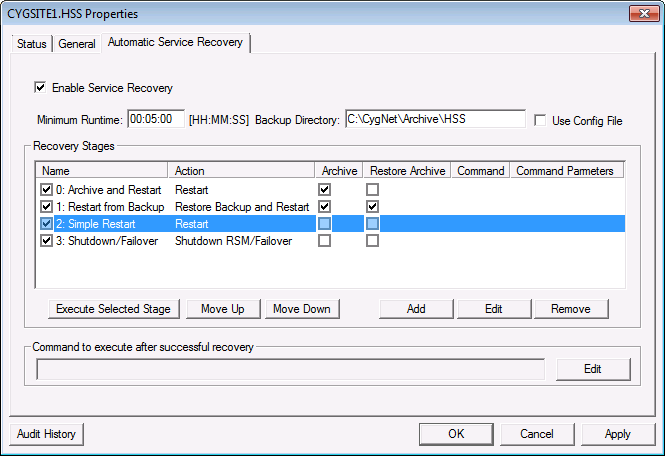
The first stage (0: Archive and Restart) archives the service files to a "recovery" folder and then attempts to restart the service. If the service does not run for 5 minutes the recovery moves to the second stage.
The second stage (1: Restore from Backup) archives the service files to a new "recovery" folder then copies the backup files from the backup folder to the service folder. It then attempts to restart the service using the backup files. If the service cannot be restarted, the RSM then copies the archive files created in this stage back into the service folder (Restore archive on failure). It does not attempt to restart again at this point.
The third stage (2: Simple Restart) attempts to restart the service again using the archive files that were re-added to the service folder as the last action of the second stage.
The fourth stage (3: Shutdown RSM) will send a shutdown command to the RSM to gracefully shutdown all services.
The difference between the archive of the first stage and the second stage is that the first stage archive includes the log files from when the service failed. The second stage archive includes the log files from the first restart attempt. The log files from the initial failure are most likely to contain information regarding the failure.

